
Overview of Sophos licenses
License via our service and you will receive the necessary license data to install or continue operating your Sophos software within one day. Here you can see an overview of our licenses and the conditions of use.
Endpoint Protection
Server Protection
Managed Services
Simple order
With just a few clicks
Pay flexibly
Invoice, SEPA, Paypal and more
Fast delivery
License after 1 day
100% Safe
Encrypted with data protection
Apply or activate Sophos licenses
You can register a new or upgraded license in the login area Sophos Central activate. Use the activation key that we will send you after your order.
Upgrades & changes
Upgrades and license changes may be updated automatically. For example, if you apply an „Intercept X with XDR“ license to an account with „Intercept X Advanced“, Sophos will update the software on all corresponding devices.
- In Sophos Central, click „Renew“, the license is started automatically after the current license expires.
- In Sophos Central, click „Change“, the license is started immediately.
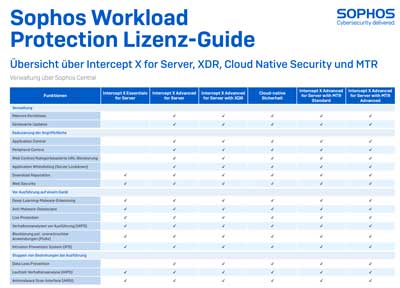
Conditions for Sophos licenses
In general:
- Licenses are subscriptions with specific terms - unless otherwise specified.
- After a subscription expires, your right of use expires. If you renew your licenses, your remaining terms will be adjusted.
- The price scales apply per order.
Endpoint Protection licenses:
- One license is valid per user.
- All end devices of a user are included in the license.
- Sophos requires an appropriate number.
- You can choose different terms.
Server Protection licenses:
- One license applies per server. This applies regardless of whether it is physical or virtual.
- You can choose different terms.
Mobile Protection licenses:
- One license is valid per user.
Email Protection Licenses:
- One license is valid per mailbox.